
OpenAI’s Sora pushed text-to-video into the mainstream by making short, high-quality clips from prompts. If you’re exploring free alternatives to OpenAI’s Sora for video generation, there are several strong options — both hosted services with free tiers and open-source toolkits you can run yourself. Below I cover practical choices, how each tool differs, sample use cases, and tips for picking the right option for your project.
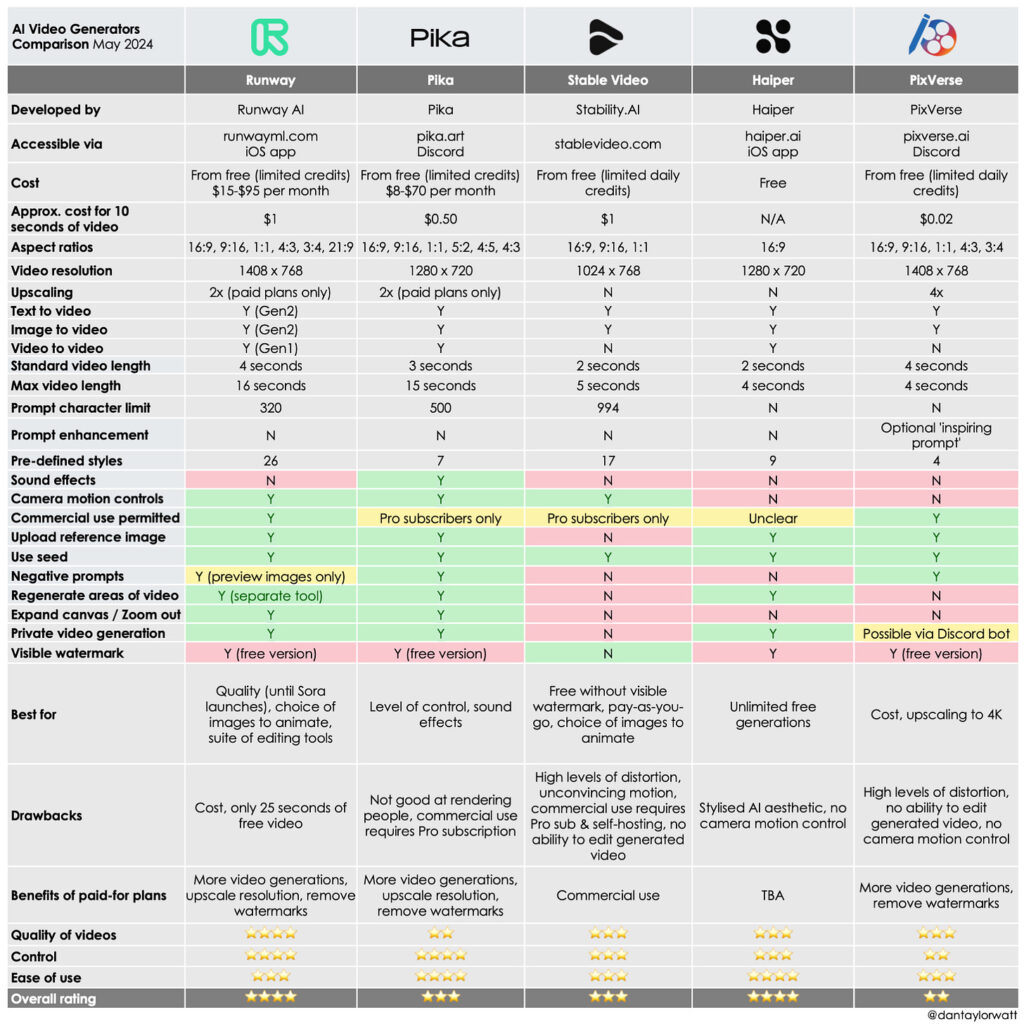
Table of Contents
Why look for free alternatives?
OpenAI Sora is powerful, but:
- It can be region-restricted or rate-limited for free users. (OpenAI)
- Commercial usage and higher-resolution output often require paid access or credits. (OpenAI)
If you’re experimenting, building prototypes, or working on a budget, free alternatives to OpenAI’s Sora for video generation let you iterate quickly without big costs.
Quick snapshot — best free alternatives (at a glance)
- Pika (Pika Labs) — browser-based, creative text→video, generous free access for quick clips. (Pika)
- Runway (Gen-2 / Gen-4 free tier credits) — pro-level results, limited free credits to test advanced models. (Runway)
- Kapwing / VEED — easy script-to-video and text-to-video tools with functional free tiers for social clips. (Kapwing)
- ModelScope / other cloud demos — research and demo endpoints offering free text-to-video experiments. (Modelscope AI)
- Open-source (AnimateDiff / Stable Diffusion + toolkits) — fully free if you run it locally or on rented GPU, best for developers. (GitHub)
1) Pika (Pika Labs) — easiest, creative-first (great for quick ideas)
What it is: a browser-first, creative text-to-video platform focused on fast, playful outputs. Many creators use Pika for concept clips and social content. (Pika)
Why try it:
- Simple UI — drop a prompt and get a short clip.
- Free plan suitable for hobbyists and testing ideas.
- Good for stylized and expressive outputs.
Best for: social shorts, concept demos, creative experiments.
Limitations: less control than research-grade models; long, photorealistic clips are harder to produce.
2) Runway — pro features with a free trial allocation
What it is: Runway offers several generative video models (Gen-2/Gen-4 family). They use a credit system; new users get a free allocation to experiment. (Runway)
Why try it:
- Higher-quality, consistent frames and better character continuity (with Gen-4).
- Built-in editor for stitching, upscaling, and compositing.
- Good balance of control and ease-of-use.
Best for: creators who want near-professional results without building a pipeline from scratch.
Limitations: free credits are limited (one-time allocation or small recurring amount); larger outputs require paid credits. (Runway)
3) Kapwing & VEED — script-to-video + editor convenience
What they are: Online editors that added AI text→video features. You paste a script or prompt, and the tool assembles footage, narration, and captions. Kapwing emphasizes quick social clips. (Kapwing)
Why try them:
- Fast learning curve for marketers and educators.
- Free tier allows small exports and testing.
- Good for narrated explainers, social repurposing, and quick marketing videos.
Best for: short explainer videos, repurposing blog posts into video, social-first content.
Limitations: less “pure” generative video realism; more template + assembly than full T2V modeling.
4) ModelScope and research demos — try advanced models for free
What it is: ModelScope and other research hubs host experimental text-to-video demos (research-grade models available via web UI or API). (Modelscope AI)
Why try it:
- Access bleeding-edge experiments (good for learning and prototyping).
- Often free or low-cost to test.
Best for: researchers, developers, and curious creators who want to compare model behavior.
Limitations: stability, availability, and production-grade guarantees vary wildly.
5) Open-source toolkits — AnimateDiff, Stable Diffusion pipelines
What it is: Community and research projects (AnimateDiff, Animatediff integrations, VideoCrafter-style repos) bring text-to-video to the open-source world. You can run them locally or on cloud GPUs. (GitHub)
Why try it:
- Fully free if you run locally (hardware is the main cost).
- Total control (custom models, long-term experiments, no API limits).
- Strong community support and tutorials.
Examples & notes:
- AnimateDiff lets Stable Diffusion models produce short, coherent motion clips with community checkpoints and guides. (GitHub)
- You can combine image models + temporal modules (Latent-Shift, AnimateZero approaches) to improve stability and control for longer clips. (arXiv)
Best for: developers, studios, and serious hobbyists comfortable with Python and GPUs.
Limitations: steep setup, GPU costs for long/high-res videos, potential flicker/time coherence issues if not tuned.
Practical comparison (how to choose)
If you want zero-setup, click-and-go:
- Try Pika or Kapwing for the fastest path to shareable clips. (Pika)
If you want near-professional quality with minimal infra work:
- Use Runway to access Gen-4/Turbo models and experiment with a free credit buffer. (Runway)
If you want total control and no recurring fees (but you’ll pay in time/GPU):
- Go open-source with AnimateDiff / local Stable Diffusion pipelines. (GitHub)
If you need API/research access:
- Check ModelScope demos and their documentation for experimenting with different research models. (Modelscope AI)
Tips to get better results (all tools)
- Be specific in prompts: describe camera angle, lighting, motion, and shot length.
- Iterate in short bursts: 3–8 seconds is easier to stabilize than 30–60s.
- Use image or video references (when supported) to lock style or character continuity.
- Combine tools: draft with a T2V demo, edit in Kapwing/Runway, and finalize with local upscalers.
- Mind copyright & attribution: read each tool’s terms before using third-party content commercially.
Example pipeline (free-first approach)
- Ideation & script — write a 20–40 word prompt or short script in ChatGPT.
- Generate base clip — use Pika or Runway free credits to make a 5–10s prototype. (Pika)
- Refine — iterate with more detailed prompts or feed an image reference.
- Edit & assemble — assemble scenes and add voice/music in Kapwing or similar. (Kapwing)
- Polish — if necessary, use open-source upscalers/AnimateDiff to smooth motion for a final export. (GitHub)
Final thoughts — is a free alternative “good enough”?
Yes — for concept videos, social content, and early prototypes, free alternatives to OpenAI’s Sora for video generation cover most needs. If you need commercial, long-form, or ultra-high fidelity content, expect to combine free tiers with paid credits or invest time in open-source pipelines and GPU access.
Sora set a high bar, but the ecosystem evolved fast: hosted platforms (Pika, Runway, Kapwing), research demos (ModelScope), and open-source toolkits (AnimateDiff) give creators a rich set of free and low-cost paths to generate stunning video content. (Pika)
Conclusion & CTA
If you’re experimenting, start with Pika or Kapwing for rapid prototyping, then graduate to Runway or an open-source pipeline when you need more control. Want a tailored recommendation?