
Artificial intelligence image generation has evolved rapidly, and Midjourney v7 represents a major leap forward in creative control, realism, and stylistic accuracy. However, the quality of images produced by Midjourney v7 depends heavily on one critical factor: the prompt. Understanding how to write effective prompts for Midjourney v7 can mean the difference between an average image and a visually stunning masterpiece.
This article explains prompt structure, best practices, common mistakes, and advanced techniques to help you get the most out of Midjourney v7.
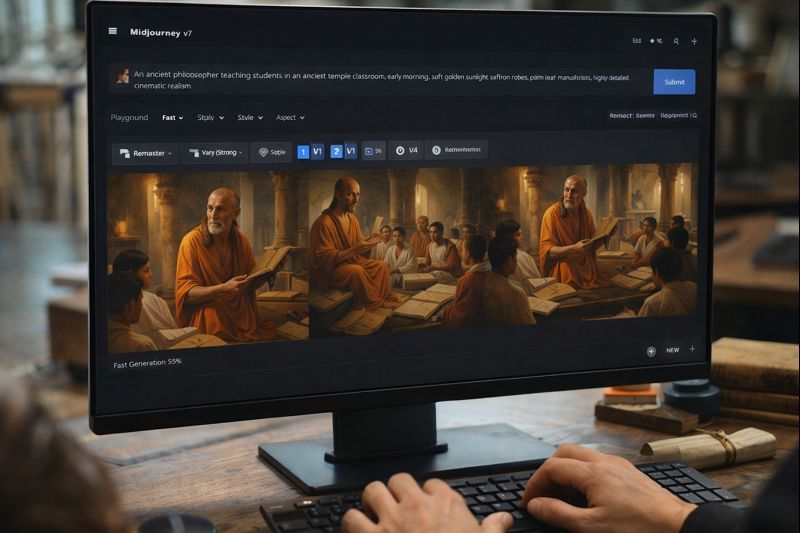
Table of Contents
Why Prompt Writing Matters in Midjourney v7
Midjourney v7 interprets prompts with greater nuance than previous versions. It understands context, composition, lighting, camera perspective, artistic styles, and emotional tone more accurately. However, this also means vague or poorly structured prompts may lead to unpredictable results.
Learning how to write effective prompts for Midjourney v7 allows you to:
- Gain precise visual control
- Reduce trial-and-error generations
- Achieve consistent artistic results
- Save time and GPU credits
In short, prompts act as the creative blueprint for AI-generated visuals.
Core Structure of an Effective Midjourney v7 Prompt
An effective prompt is not just a sentence—it is a structured instruction. A strong Midjourney v7 prompt typically includes the following elements:
- Subject
- Action or Pose
- Environment
- Style
- Lighting
- Camera Details
- Mood or Emotion
- Technical Modifiers
Example Structure:
A medieval scholar reading ancient manuscripts in a candle-lit library, cinematic realism, warm lighting, shallow depth of field, ultra-detailed, 4k
This structure ensures the AI understands what to generate and how it should look.
Choosing the Right Subject Description
The subject is the foundation of your prompt. Be specific rather than generic.
❌ Weak:
A man
✅ Strong:
An elderly philosopher with a shaved head, intense eyes, and saffron robes
Specific physical traits, age, clothing, and expressions help Midjourney v7 generate accurate visuals.
Defining Environment and Background
Midjourney v7 responds exceptionally well to environmental details. Always specify where the subject exists.
Examples:
- Ancient classroom with stone pillars
- Futuristic city at night with neon lights
- Forest temple during monsoon rain
Environmental cues add depth, realism, and storytelling to the image.
Using Artistic Styles Effectively
One of the most powerful features of Midjourney v7 is its ability to replicate artistic styles.
You can specify:
- Painting styles (oil painting, watercolor, ink sketch)
- Digital art styles (concept art, cinematic render)
- Historical art movements (renaissance, baroque, surrealism)
Example:
Digital painting, cinematic realism, hyper-detailed textures
Avoid mixing too many styles, as it can confuse the model.
Lighting: The Hidden Power of Prompts
Lighting dramatically changes mood and realism. Midjourney v7 understands complex lighting instructions.
Common lighting terms:
- Soft natural light
- Golden hour lighting
- Dramatic chiaroscuro
- Volumetric light rays
- Low-key cinematic lighting
Adding lighting improves visual quality more than most users realize.
Camera Angles and Perspective
Professional-looking images often come from camera-related instructions.
Examples:
- Close-up portrait
- Wide-angle shot
- Over-the-shoulder view
- Shallow depth of field
- Cinematic framing
Example Prompt Addition:
Shot with a 50mm lens, shallow depth of field
These details help Midjourney v7 mimic real photography.
Mood, Emotion, and Atmosphere
Midjourney v7 is capable of emotional storytelling. Always describe the mood.
Mood keywords include:
- Calm
- Mysterious
- Powerful
- Spiritual
- Dramatic
Example:
A peaceful, contemplative atmosphere with warm tones
Emotion adds narrative depth and improves viewer engagement.
Using Modifiers and Quality Enhancers
Modifiers improve sharpness, realism, and overall aesthetics.
Popular modifiers:
- Ultra-detailed
- High resolution
- Photorealistic
- Cinematic quality
- Unreal Engine style
Use them sparingly to avoid cluttering the prompt.
Negative Prompting (What to Avoid)
Midjourney v7 also benefits from negative instructions, which tell the AI what not to include.
Examples:
No blur, no distortion, no extra limbs, no watermark
This is especially useful for portraits and realistic renders.
Common Prompt Mistakes to Avoid
Many users struggle because of these common errors:
- Being too vague
- Overloading prompts with unrelated styles
- Using conflicting instructions
- Ignoring lighting and camera details
- Copy-pasting prompts without customization
Learning how to write effective prompts for Midjourney v7 requires experimentation, but structured thinking speeds up mastery.
Advanced Prompting Tips for Midjourney v7
1. Use Priority Ordering
Important details should come earlier in the prompt.
2. Break Long Ideas into Clear Phrases
Avoid long, confusing sentences.
3. Test Variations
Slight changes in wording can significantly affect results.
4. Build a Personal Prompt Library
Save successful prompts and reuse them with adjustments.
Sample High-Quality Prompt for Midjourney v7
An ancient Indian philosopher teaching students in an open-air stone classroom, early morning golden sunlight, saffron robes, palm-leaf manuscripts, calm spiritual atmosphere, cinematic realism, ultra-detailed textures, soft shadows, wide-angle composition
This prompt is clear, descriptive, and optimized for Midjourney v7’s strengths.
Conclusion
Understanding how to write effective prompts for Midjourney v7 is a skill that combines creativity, clarity, and structure. Midjourney v7 is powerful, but it relies on precise human direction. By defining subject, environment, style, lighting, mood, and camera perspective, you can consistently generate high-quality, professional visuals.
The better your prompts, the better your results—every single time.