
Google Pomelli vs Canva — which AI design tool wins for content creators in 2026? Discover the real differences, features, and the smartest choice for your workflow.
You’ve probably been using Canva for years. Then, seemingly overnight, Google dropped something entirely new into the conversation — and now the Google Pomelli vs Canva debate is dominating marketing communities around the world. Which one deserves a place in your content workflow? Which one actually understands your brand? And most importantly — do you need to choose, or can you use both?
This in-depth comparison is written specifically for content creators who need real answers, not vague feature lists. By the time you finish reading, you’ll know exactly where each tool excels, where it falls short, and how to make the smartest decision for your specific creative needs in 2026.
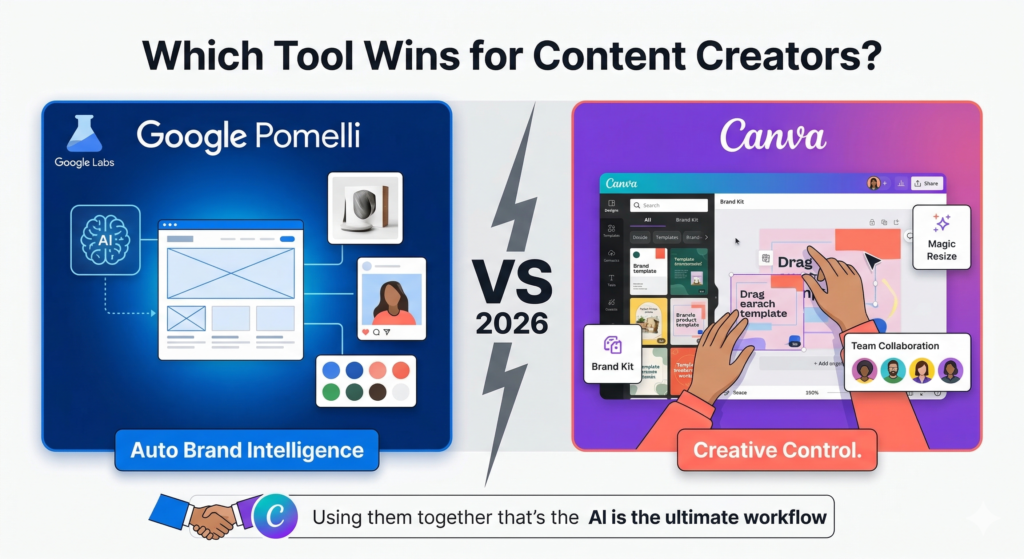
Table of Contents
What Is Google Pomelli? A Quick Overview for Content Creators
Before diving into the Google Pomelli vs Canva comparison, it’s worth understanding what Google Pomelli actually is — because many creators are still discovering it.
Google Pomelli is a free AI-powered marketing tool developed by Google Labs in collaboration with Google DeepMind. It was first launched on October 28, 2025, and expanded to over 170 countries and territories on March 9, 2026. The tool is built around a central concept called “Business DNA” — an automated brand profile that Pomelli builds by scanning your website’s text, images, fonts, colors, and overall aesthetic.
Google Pomelli’s core function is brand-first content generation. Once it understands your brand, it can generate social media campaigns, product photography, animated videos, and ad creatives that are aligned with your visual and tonal identity — all without you manually setting a single brand parameter.
According to research data, 77% of brands admit to regularly publishing off-brand content. Google Labs designed Pomelli specifically to eliminate that problem at the source, rather than patching it with manual corrections downstream.
What Is Canva? Why Creators Have Relied on It for Years
Canva needs little introduction. Founded in 2013, it has grown into one of the world’s most widely used design platforms, with over 150 million users globally. It operates on a freemium model, with Canva Pro priced at approximately $120 per year, offering access to premium templates, the Brand Kit feature, Magic Studio AI tools, and advanced collaboration capabilities.
Canva’s greatest strength is its flexibility. It gives content creators a vast library of templates, a drag-and-drop editing interface, and AI-powered tools like Magic Write, Magic Resize, Background Remover, and Style Match. Unlike Google Pomelli, Canva is not purely an AI-generation tool — it is a full design environment where human creativity drives the output and AI assists the process.
For teams, Canva’s collaborative workspace, approval workflows, and centralized asset management make it a production-grade platform, not just a personal design tool.
Google Pomelli vs Canva: Feature-by-Feature Breakdown
This is where the Google Pomelli vs Canva comparison becomes genuinely useful. Let’s look at what each tool does across the areas that matter most to content creators.
Core Design Capabilities
Canva operates as a traditional design environment enhanced by AI. You choose a template, customize it, and publish. The design decisions remain largely in your hands — Canva accelerates execution, but the creative direction is yours to define.
Google Pomelli takes the opposite approach. It makes creative decisions for you based on your brand data. You don’t choose a template — Pomelli selects visual direction, generates copy, and produces campaign assets autonomously. The output is AI-led, not human-led.
For creators who value control, Canva wins. For creators who value speed and brand consistency, Pomelli wins.
Brand Consistency
This is arguably the most critical factor for professional content creators. Canva handles brand consistency through its Brand Kit feature, which stores your logos, color palettes, and fonts. However, you must manually configure this — and manually apply it to every new design.
Google Labs built Pomelli to solve brand consistency at a more fundamental level. The Business DNA profile is not a repository you configure — it is an intelligence layer that actively governs every piece of content Pomelli generates. Colors, tone, fonts, and aesthetic language are enforced automatically.
In the Google Pomelli vs Canva debate around brand governance, Pomelli holds a clear structural advantage — though it requires an established website to extract accurate brand signals.
AI-Powered Features
Canva’s Magic Studio suite is comprehensive and mature. It includes Magic Write for copy generation, Magic Resize for instant platform formatting, Background Remover, Translate for multilingual content, and Style Match for aesthetic consistency. These tools are embedded naturally into the design workflow.
Google Pomelli’s AI features are more specialized but arguably more powerful within their scope. The Photoshoot feature, launched in February 2026 and powered by Google’s Nano Banana 2 image generation model, transforms basic smartphone product photos into studio-quality marketing images in seconds. Professional product photography typically costs between $500 and $5,000 per shoot — Pomelli eliminates that cost entirely for small businesses and independent creators.
Additionally, the Animate feature, launched in January 2026 via Google’s Veo 3.1 model, converts any static campaign asset into a short-form animated brand video in a single click. This level of video generation is not available natively inside Canva’s standard workflow.
Platform Coverage and Output Formats
| Feature | Google Pomelli | Canva |
|---|---|---|
| Social media post generation | Instagram, Facebook, X, LinkedIn, YouTube thumbnails, Google Ads, email banners | All major platforms via templates |
| Product photography | Yes (Photoshoot, AI-generated) | No native feature |
| Animated brand video | Yes (Animate via Veo 3.1) | Limited (via integrations) |
| Drag-and-drop design | No | Yes |
| Team collaboration | No | Yes (Canva for Teams) |
| Brand Kit / DNA | Automatic (Business DNA) | Manual setup required |
| Pricing | Free (beta, 300 generations/month cap) | Free tier + Pro at ~$120/year |
| Availability | 170+ countries (English only) | Global, multilingual |
Where Google Pomelli Outperforms Canva
In the Google Pomelli vs Canva comparison, there are specific scenarios where Pomelli delivers results that Canva simply cannot match without significantly more manual effort.
Speed of brand-consistent output is Pomelli’s defining advantage. Once the Business DNA profile is established, generating ten on-brand post variations takes approximately 60 seconds — roughly 30 to 40 percent faster than building the same output manually in Canva. For content creators managing high-volume social media schedules, that difference is substantial.
The Photoshoot feature is another area where Pomelli stands alone. Canva does not offer AI-powered product photography. If you are an e-commerce creator, a brand ambassador, or a product reviewer, Pomelli’s ability to generate studio-quality product imagery from a single smartphone photo is a capability with no direct equivalent in the Canva ecosystem.
Furthermore, Google Pomelli’s AI-first architecture means it is designed to think about marketing strategy, not just design execution. When you prompt Pomelli with a campaign goal — such as “promote my seasonal sale” or “announce my new service” — it generates multiple campaign concepts tailored to your brand, not just visual templates. This strategic layer is something Canva does not attempt to provide.
Where Canva Outperforms Google Pomelli
The Google Pomelli vs Canva conversation would be incomplete without honestly acknowledging where Canva maintains a significant edge.
Creative control is Canva’s most important advantage. As an experienced content creator, you likely have a strong sense of your visual preferences that extends beyond what an AI can extract from a website scan. Canva allows you to design exactly what you envision. Pomelli gives you what the algorithm decides. For creators with refined aesthetic sensibilities, that distinction matters enormously.
Canva’s collaboration infrastructure is also far superior for teams. Google Labs built Pomelli as a solo business tool — there is no calendar view, no approval workflow, and no multi-user collaboration. Marketing teams, content agencies, and freelancers managing multiple clients will find Pomelli’s current feature set too limited for professional team environments.
Canva’s multilingual support is another practical advantage. As of March 2026, Pomelli is available in 170+ countries but supports English only. Creators producing content in Hindi, Spanish, French, Portuguese, or any other language cannot yet use Pomelli’s generation features in their native language. Canva, by contrast, operates across dozens of languages and is genuinely global in its accessibility.
Finally, the maturity of Canva’s template library — spanning millions of professionally designed layouts across every industry and format — gives creators a level of starting-point variety that Pomelli’s AI-generated outputs currently cannot replicate.
Common Mistakes Creators Make When Choosing Between These Tools
This section addresses a mistake that is quietly costing creators time and results.
Mistake #1: Treating this as a binary choice. The majority of creators asking the Google Pomelli vs Canva question assume they must pick one and abandon the other. That framing is incorrect. The most effective creator workflow in 2026 uses Pomelli as the brand intelligence and ideation layer, and Canva as the design execution and collaboration layer. They serve different functions and complement each other rather than compete.
Mistake #2: Using Canva without setting up the Brand Kit. According to usage data, most Canva users have never properly configured a Brand Kit. This means they are manually correcting colors and fonts on every single design — the exact problem Canva’s Brand Kit feature was designed to eliminate. Before adopting any new tool, maximize what you already have.
Mistake #3: Expecting Pomelli to work well for brands with weak web presence. Google Labs designed Pomelli to extract brand identity from your website. If your website is outdated, visually inconsistent, or lacks clear brand signals, Pomelli’s Business DNA profile will be inaccurate — and every generated asset will reflect that inaccuracy. Fix your website before relying on Pomelli’s outputs.
Which Tool Is Right for You? An Honest Assessment
The Google Pomelli vs Canva question ultimately comes down to your specific creator profile.
Choose Google Pomelli as your primary tool if: you run a small business or creator brand with a consistent website identity, you prioritize speed over fine-grained design control, you need product photography without a photography budget, and you operate primarily in English.
Choose Canva as your primary tool if: you work in a team environment, you produce multilingual content, you need precise creative control over every visual element, or you manage content for multiple clients with different brand identities.
Use both if: you want to combine Pomelli’s brand-intelligent campaign generation with Canva’s execution power, team features, and template library — which represents the most capable workflow available to content creators today.
According to research from McKinsey, knowledge workers who adopt AI-assisted workflows report productivity gains of up to 40% on repetitive creative tasks. Neither Google Pomelli nor Canva alone delivers that outcome as reliably as the two tools used in combination.
FAQ: Google Pomelli vs Canva
Q: Is Google Pomelli completely free? Yes. As of March 2026, Google Pomelli is free during its public beta phase, with a cap of 300 image generations per month. Google has not announced any commercial pricing plans.
Q: Can I use Google Pomelli without a website? Technically yes, but the Business DNA profile will be significantly less accurate. The tool is designed to extract brand intelligence from an existing website, so creators without one should manually refine the profile before generating content.
Q: Does Canva have anything like Pomelli’s Business DNA feature? No. Canva’s Brand Kit requires manual configuration. It stores your brand assets but does not analyze or interpret your brand identity the way Pomelli’s Business DNA does automatically.
Q: Is Google Pomelli available in India and other non-English countries? Yes. As of March 9, 2026, Pomelli expanded to over 170 countries including India. However, the tool currently supports English only, with no confirmed timeline for additional language support.
Q: Which tool is better for beginners with no design experience? For absolute beginners, Google Pomelli has a lower learning curve because it removes design decisions from the equation entirely. However, Canva’s template-based approach is also highly accessible and offers more creative flexibility as your skills develop.
Conclusion: The Smartest Decision for Content Creators in 2026
The Google Pomelli vs Canva debate has a clear answer — and it’s not the one most people expect.
The most important takeaway from this entire comparison is that these tools are not rivals. They occupy different positions in the content creation stack. Google Pomelli is a brand-intelligent AI that generates campaign-ready assets automatically. Canva is a design environment that gives you control, collaboration, and creative range. Together, they form a workflow that no single tool can replicate alone.
The second key takeaway is that Google Labs has built something genuinely innovative with Pomelli — and the fact that it remains completely free during beta makes this one of the most significant opportunities in the current AI marketing landscape. The 300-image-per-month limit is generous for most solo creators, and features like Photoshoot and Animate represent capabilities that would have cost thousands of dollars annually just 18 months ago.
The third and final takeaway: the question is not “Google Pomelli or Canva” — it is “how quickly can I learn to use them together?”